The purpose of thread signaling is to enable threads to send signals to each other. Additionally, thread signaling enables threads to wait for signals from other threads. For instance, a thread B might wait for a signal from thread A indicating that data is ready to be processed.
Signaling via Shared Objects
A simple way for threads to send signals to each other is by setting the signal values in some shared object variable. Thread A may set the boolean member variable hasDataToProcess to true from inside a synchronized block, and thread B may read the hasDataToProcess member variable, also inside a synchronized block. Here is a simple example of an object that can hold such a signal, and provide methods to set and check it:
线程通信的目的是使线程可以相互发送信号。此外,线程通信可以使线程等待其他线程的信息。例如,线程B可能等待线程Ad的信号来指导准备处理的数据。
通过共享对象通信
一个简单的方式来实现线程相互发送信息是通过在一些共享变量中设置信号量值。线程A可以在同步块中设置布尔型成员变量hasDataToProcess为true,线程B同样在同步块中读取成员变量hasDataToProcess。这里是一个简单例子一个对象保持一个信号量,并且提供方法设置,检查该值。
public class MySignal{

  protected boolean hasDataToProcess = false;

  public synchronized boolean hasDataToProcess(){
    return this.hasDataToProcess;
  }

  public synchronized void setHasDataToProcess(boolean hasData){
    this.hasDataToProcess = hasData;
  }

}
Thread A and B must have a reference to a shared MySignal instance for the signaling to work. If thread A and B has references to different MySignal instance, they will not detect each others signals. The data to be processed can be located in a shared buffer separate from the MySignal instance.
线程A、B为了能够工作时通信,必须有共享的MySignal实例的引用。如果线程A、B引用了不同的MySignal实例,那么他们不会发现彼此信息。要处理的数据可以位于与MySignal实例不同的共享区中。
Busy Wait
Thread B which is to process the data is waiting for data to become available for processing. In other words, it is waiting for a signal from thread A which causes hasDataToProcess() to return true. Here is the loop that thread B is running in, while waiting for this signal:
忙碌等待
处理数据的线程B一直等待数据是变为可处理的。或者说,它一直等待让hasDataToProcess()方法返回true的信号。这里是一个线程B一直运行的循环,等待该信号。
protected MySignal sharedSignal = ...

...

while(!sharedSignal.hasDataToProcess()){
  //do nothing... busy waiting
}
Notice how the while loop keeps executing until hasDataToProcess() returns true. This is called busy waiting. The thread is busy while waiting.
注意while循环是如何执行的知道hasDataToProcess()方法返回true。这成为“忙碌等待”。这个线程在等待时是繁忙的。
wait(), notify() and notifyAll()
Busy waiting is not a very efficient utilization of the CPU in the computer running the waiting thread, except if the average waiting time is very small. Else, it would be smarter if the waiting thread could somehow sleep or become inactive until it receives the signal it is waiting for.
Java has a builtin wait mechanism that enable threads to become inactive while waiting for signals. The class java.lang.Object defines three methods, wait(), notify(), and notifyAll(), to facilitate this.
A thread that calls wait() on any object becomes inactive until another thread calls notify() on that object. In order to call either wait() or notify the calling thread must first obtain the lock on that object. In other words, the calling thread must call wait() or notify() from inside a synchronized block. Here is a modified version of MySignal called MyWaitNotify that uses wait() and notify().
wait(),notify(),notifyAll()
在计算机运行等待线程,忙碌等待不是对CPU高效的利用,除非是平均等待时间是非常小。否则,它将更加智能如如果等待线程可以通过某中方式休眠或者变成低活跃状态,直到它接收到了它等待的信号。
Java有内建的等待机制可以使线程在等待信号时变得不活跃。java.lang.Object类中定义了三个方法,wait(),notify(),notifyAll(),来实现它。
线程在任何对象上调用wait()都变为不活跃的,直到其它线程调用了该对象的notify()方法。为了调用wait()或通知调用线程,必须首先获取该对象的锁。换而言之,调用线程必须在同步块中调用wait()和notify()方法。这是一个MySignal修改后的版本,称为MyWaitNotify,它调用了wait()和notify()方法。
public class MonitorObject{ }
public class MyWaitNotify{
MonitorObject myMonitorObject = new MonitorObject();
public void doWait(){ synchronized(myMonitorObject){ try{ myMonitorObject.wait(); } catch(InterruptedException e){…} } }
public void doNotify(){ synchronized(myMonitorObject){ myMonitorObject.notify(); } } } The waiting thread would call doWait(), and the notifying thread would call doNotify(). When a thread calls notify() on an object, one of the threads waiting on that object are awakened and allowed to execute. There is also a notifyAll() method that will wake all threads waiting on a given object.
As you can see both the waiting and notifying thread calls wait() and notify() from within a synchronized block. This is mandatory! A thread cannot call wait(), notify() or notifyAll() without holding the lock on the object the method is called on. If it does, an IllegalMonitorStateException is thrown.
But, how is this possible? Wouldn’t the waiting thread keep the lock on the monitor object (myMonitorObject) as long as it is executing inside a synchronized block? Will the waiting thread not block the notifying thread from ever entering the synchronized block in doNotify()? The answer is no. Once a thread calls wait() it releases the lock it holds on the monitor object. This allows other threads to call wait() or notify() too, since these methods must be called from inside a synchronized block.
Once a thread is awakened it cannot exit the wait() call until the thread calling notify() has left its synchronized block. In other words: The awakened thread must reobtain the lock on the monitor object before it can exit the wait() call, because the wait call is nested inside a synchronized block. If multiple threads are awakened using notifyAll() only one awakened thread at a time can exit the wait() method, since each thread must obtain the lock on the monitor object in turn before exiting wait().
等待线程调用doWait()方法,唤醒线程将调用doNotify()方法。当一个线程调用了对象的notify()方法,等待该对象的线程中的一个(不知道这个线程是不是随机选取的???)将被唤醒,且允许执行。也有一个notifyAll()方法来唤醒所有的给定对象等待的线程。
正如你看到的那样,等待和唤醒线程都在一个同步块中调用wati()和notify()方法。这是强制的!!!线程不能调用wait(),notify(),notifyAll()方法而不持有对象锁。如果这么做的话,将抛出IllegalMonitorStateException异常
但是这怎么可能呢?等待线程会不会在同步块中执行而不持有监视对象(myMonitorObject)的锁?等待的线程不会阻止通知线程进入doNotify()的同步块吗?答案是否定的。一旦线程调用了wait()方法它将释放持有的监视对象上的锁。这也允许其他线程调用wait()或者nitify()方法。因为这些方法必须在同步块中调用。
一但线程被唤醒,并不会推出wait()方法,知道调用notify()的方法离开同步块。换而言之,被唤醒的线程必须在退出wait()方法前重新获取监视对象锁,因为等待调用嵌套在一个synchronized块中。如果使用notifyAll()多个线程被唤醒,仅有一个线程可以推出wait()方法,因为每个线程必须在推出wait()方法前获取监视对象的锁。
Missed Signals
The methods notify() and notifyAll() do not save the method calls to them in case no threads are waiting when they are called. The notify signal is then just lost. Therefore, if a thread calls notify() before the thread to signal has called wait(), the signal will be missed by the waiting thread. This may or may not be a problem, but in some cases this may result in the waiting thread waiting forever, never waking up, because the signal to wake up was missed.
To avoid losing signals they should be stored inside the signal class. In the MyWaitNotify example the notify signal should be stored in a member variable inside the MyWaitNotify instance. Here is a modified version of MyWaitNotify that does this:
信号丢失
方法notify()和notifyAll()不保存方法调用,以防在调用时没有线程等待,唤醒信号就丢失掉了。因此,如果一个线程在该信号有关的线程(不是同一个线程)调用wait()方法前调用了nofity()方法,那么等待线程将错过该信号。这也许是也许不是一个问题,但是在某些情况下将导致等待线程一直等待下去,永远不会唤醒, 因为唤醒它的信号丢失了。
为了避免丢失信号,它们(信号们)应该存储在单独的类中。在MyWaitNotify例子中,唤醒信号存储在MyWatiNotify实例的成员变量中。这里有个MyWaitNotify的修改版:
public class MyWaitNotify2{
MonitorObject myMonitorObject = new MonitorObject(); boolean wasSignalled = false;
public void doWait(){ synchronized(myMonitorObject){ if(!wasSignalled){ try{ myMonitorObject.wait(); } catch(InterruptedException e){…} } //clear signal and continue running. wasSignalled = false; } }
public void doNotify(){ synchronized(myMonitorObject){ wasSignalled = true; myMonitorObject.notify(); } } } Notice how the doNotify() method now sets the wasSignalled variable to true before calling notify(). Also, notice how the doWait() method now checks the wasSignalled variable before calling wait(). In fact it only calls wait() if no signal was received in between the previous doWait() call and this.
Spurious Wakeups
For inexplicable reasons it is possible for threads to wake up even if notify() and notifyAll() has not been called. This is known as spurious wakeups. Wakeups without any reason.
If a spurious wakeup occurs in the MyWaitNofity2 class’s doWait() method the waiting thread may continue processing without having received a proper signal to do so! This could cause serious problems in your application.
To guard against spurious wakeups the signal member variable is checked inside a while loop instead of inside an if-statement. Such a while loop is also called a spin lock. The thread awakened spins around until the condition in the spin lock (while loop) becomes false. Here is a modified version of MyWaitNotify2 that shows this:
注意doNotify()方法如何在调用nofify()方法前设置wasSignalled变量为true的。也要注意到doWait()方法在调用wait()方法前检查了wasSignalled变量的。实际上,它只调用wait(),如果在之前的doWait()调用和这个调用之间没有收到信号。
假唤醒
一些无法解释的原因,可能会唤醒线程即使没有notify(),nofityAll()方法被调用。这就是假唤醒,没有原因唤醒。
如果在MyhWaitNofity2类的doWait()发生假唤醒,等待线程可能没有接受到正确的正确的让它这么做信息就继续执行。这可能会在你的应用中导致眼中的问题。
为了避免这种假唤醒,信号成员变量要在while循环中不断检查其职,而不是使用if声明。这样的while循环称之为“自旋锁”。被唤醒的线程自旋直到自旋锁中的条件(while循环)变成false。这里是对MyWaitNotify2的修改版:
public class MyWaitNotify3{

  MonitorObject myMonitorObject = new MonitorObject();
  boolean wasSignalled = false;

  public void doWait(){
    synchronized(myMonitorObject){
      while(!wasSignalled){
        try{
          myMonitorObject.wait();
         } catch(InterruptedException e){...}
      }
      //clear signal and continue running.
      wasSignalled = false;
    }
  }

  public void doNotify(){
    synchronized(myMonitorObject){
      wasSignalled = true;
      myMonitorObject.notify();
    }
  }
}
Notice how the wait() call is now nested inside a while loop instead of an if-statement. If the waiting thread wakes up without having received a signal, the wasSignalled member will still be false, and the while loop will execute once more, causing the awakened thread to go back to waiting.
Multiple Threads Waiting for the Same Signals
The while loop is also a nice solution if you have multiple threads waiting, which are all awakened using notifyAll(), but only one of them should be allowed to continue. Only one thread at a time will be able to obtain the lock on the monitor object, meaning only one thread can exit the wait() call and clear the wasSignalled flag. Once this thread then exits the synchronized block in the doWait() method, the other threads can exit the wait() call and check the wasSignalled member variable inside the while loop. However, this flag was cleared by the first thread waking up, so the rest of the awakened threads go back to waiting, until the next signal arrives.
Don’t call wait() on constant String’s or global objects
An earlier version of this text had an edition of the MyWaitNotify example class which used a constant string ( “” ) as monitor object. Here is how that example looked:
注意wait()方法嵌入在while循环中而不是if声明中。如果等待线程没有接受到信号就唤醒,那么wasSignalled成员将是false值,并且while再执行一次,让唤醒的线程回到等待状态。
多个线程等待同一个信号
如果你有多个线程在等待notifyAll()唤醒,while循环是一个很好的方案。但是只有只允许一个线程继续。只有一个线程在这个时刻获取监视对象的锁,意思是只有一个线程可以退出wait()调用,清楚wasignalled 标志。一旦这个线程退出了doWait()方法的同步块,其他线程也可以退出wait()调用,并且检查在while循环中的wasSinalled 成员变量(这样还是只有一个线程去工作了,其他线程继续自旋)。然而,这个标志已经被第一个被唤醒的线程清除了,所以其他唤醒的线程返回等待状态直到下一个信号到达。(要注意这里的线程都是作用在同一个监视对象示例的线程)
不要调用字符串常量和全局对象的wait()方法
在此文的早期版本中有一种使用空字符串常量的MyWaitNotify的版本。看起来想这样:
public class MyWaitNotify{

  String myMonitorObject = "";
  boolean wasSignalled = false;

  public void doWait(){
    synchronized(myMonitorObject){
      while(!wasSignalled){
        try{
          myMonitorObject.wait();
         } catch(InterruptedException e){...}
      }
      //clear signal and continue running.
      wasSignalled = false;
    }
  }

  public void doNotify(){
    synchronized(myMonitorObject){
      wasSignalled = true;
      myMonitorObject.notify();
    }
  }
}
The problem with calling wait() and notify() on the empty string, or any other constant string is, that the JVM/Compiler internally translates constant strings into the same object. That means, that even if you have two different MyWaitNotify instances, they both reference the same empty string instance. This also means that threads calling doWait() on the first MyWaitNotify instance risk being awakened by doNotify() calls on the second MyWaitNotify instance.
The situation is sketched in the diagram below:
调用空字符串或者其他字符串常量的wait()和notify()方法的问世是内部的虚拟机或编译器转换字符串常量为同一个对象。意思是,即使你有不同的MyWaitNotify示例,它们引用的却是同一个空字符串实例。也就是说,调用第一个MyWaitNotify实例doWait()方法的线程可以通过调用第二个MyWaitNotify实例的doNotify()方法唤醒。(我们知道在jvm中内容相同的字符串是同一个实例。)
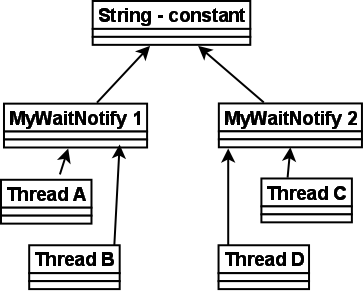
Remember, that even if the 4 threads call wait() and notify() on the same shared string instance, the signals from the doWait() and doNotify() calls are stored individually in the two MyWaitNotify instances. A doNotify() call on the MyWaitNotify 1 may wake threads waiting in MyWaitNotify 2, but the signal will only be stored in MyWaitNotify 1.
At first this may not seem like a big problem. After all, if doNotify() is called on the second MyWaitNotify instance all that can really happen is that Thread A and B are awakened by mistake. This awakened thread (A or B) will check its signal in the while loop, and go back to waiting because doNotify() was not called on the first MyWaitNotify instance, in which they are waiting. This situation is equal to a provoked spurious wakeup. Thread A or B awakens without having been signaled. But the code can handle this, so the threads go back to waiting.
The problem is, that since the doNotify() call only calls notify() and not notifyAll(), only one thread is awakened even if 4 threads are waiting on the same string instance (the empty string). So, if one of the threads A or B is awakened when really the signal was for C or D, the awakened thread (A or B) will check its signal, see that no signal was received, and go back to waiting. Neither C or D wakes up to check the signal they had actually received, so the signal is missed. This situation is equal to the missed signals problem described earlier. C and D were sent a signal but fail to respond to it.
If the doNotify() method had called notifyAll() instead of notify(), all waiting threads had been awakened and checked for signals in turn. Thread A and B would have gone back to waiting, but one of either C or D would have noticed the signal and left the doWait() method call. The other of C and D would go back to waiting, because the thread discovering the signal clears it on the way out of doWait().
You may be tempted then to always call notifyAll() instead notify(), but this is a bad idea performance wise. There is no reason to wake up all threads waiting when only one of them can respond to the signal.
So: Don’t use global objects, string constants etc. for wait() / notify() mechanisms. Use an object that is unique to the construct using it. For instance, each MyWaitNotify3 (example from earlier sections) instance has its own MonitorObject instance rather than using the empty string for wait() / notify() calls.
记住,即使在同一个共享字符串实例上四个线程调用了wait()和notify()方法,来自doWait()和doNotify()方法调用的信号存储在分开的两个MyWaitNotify实例中。在MyWaitNotify 1的doNotify()方法也许唤醒了MyWaitNotify 2中的等待线程,但是这个信号仅仅存储在MyWaitNotify 1中。
起初这看起来并不是大问题,毕竟,如果调用了第二个MyWaitNotify实例的doNotify()方法,所有的情况就是线程A、B都被错误地唤醒。唤醒的线程(A或者B)将检查它在while循环的信号,并且返回到等待状态,因为第一个MyWaitNotify实例的doNotify()方法没有被调用,它们(与第一个MyWaitNotify实例有关的线程)继续等待。这种情形与上面的假唤醒相同。线程A或B在没有信号的情况下唤醒。但是代码可以处理这个问题,所以线程会返回等待。
问题是,因为doNotify()方法只调用了notify()方法而不是notifyAll()方法,只有一个线程被唤醒,即使四个线程都在同一个字符串实例(这个空字符串)。因此,如果信号是发送给线程C或D时,一个线程A或B被唤醒(不要忘记上面说的线程可以被不可解释的原因唤醒),唤醒线程(A或B)将检查它的信号,看到没有接收到信号,然后返回等待。C或D都没有醒来检查他们实际收到的信号,所以信号被错过了(线程A,B,C,D都作用在同一个MyWaitNotify上)。这种情况就等于前面描述的未被忽略的信号问题。C和D被发送信号,但没有响应。
如果doNotify()方法调用的是notifyAll()方法而不是notify()方法,所有的等待线程都将被唤醒,轮流检查此信号。线程A,B将返回到等待状态,但是线程C,D中的一个线程将注意到此信号并离开doWait()方法调用。C,D之一将返回到等待状态,因为线程发现此信号并顺便清除了它。
你可能以后总是调用notifyAll()方法而不是notify()方法,但这是在性能上是个坏主意。当只有一个线程可以响应此信号时,没有理由唤醒所有的等待线程。
总结:不要使用全部变量,字符串常量等,因为wait()/notify()机制。使用一个对使用它的构造器唯一的对象。例如,每个MyWaitNotify3(上面的例子)实例有自己的MonitorObject实例而不是使用在wait()/notify()方法调用时使用空字符串。